Minecraft skin base · Plain bodies
Plain base, porcelain
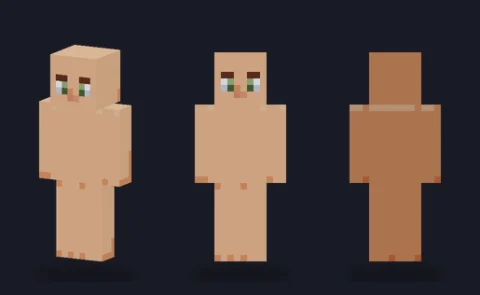
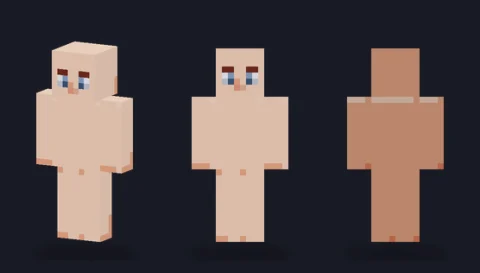
A hair-ready body in tone 1 (porcelain) with a simple face and soft three-side shading: the blank figure to dress into your own character.

Our take
The lightest of the six bodies and the easiest to dress: pale skin forgives almost any clothing colour, so this is the base to grab when you have an outfit in mind but no character yet.
What it's good for
Fair-skinned characters, pale fantasy races you plan to tint later, and anyone learning to shade, because every shadow you paint over it reads clearly against such a light ground. It also suits matching sets: dress three copies differently and the bodies still line up.
Design notes
The whole skin is built from four tones of one porcelain colour. The front of each part carries the main tone, the character's right side and back step darker, and the top of the head is lifted so it reads as lit from above. The face is deliberately minimal: two blue eyes with white corners, short brows and a neutral mouth. Nothing sits on the overlay layer, so every hat, jacket and sleeve is still yours to decide.
Measured palette: the main colour groups in the file, with the share of painted pixels each covers.
#eaa88751%#f3d2bd33%#f4d9c510%#db7b5a6%
Customise it in the editor
- Fill the torso and arms with one shirt colour, then use Darken once on the right-side faces to copy the body's light direction.
- Paint hair on the top face first and bring a fringe down two rows on the front; the lifted head-top tone shows you where the light lands.
- Use the overlay layer for a cap or glasses so you can switch them off later without touching the face.
Open plain base, porcelain in the editor to try these: it loads on the classic model, and the slim version is one click away too.
Classic or slim?
This one opens on Classic (4-pixel arms). The Slim file has the same tones packed into 3-pixel arms; because the body is plain, both look equally clean, so pick whichever arm width your outfit plans need.