Minecraft skin base · Hair
Long straight, blue-black
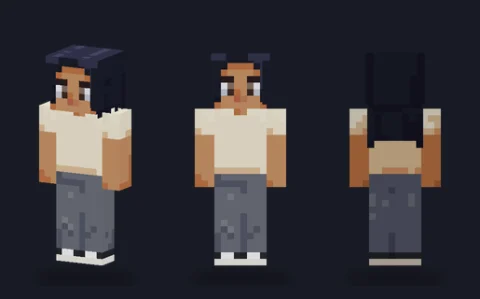
Long straight blue-black hair that frames the face and falls down the back, on a cream tee and wide grey trousers.

Our take
Long hair done properly: it frames the face, falls down the back of the body and uses the overlay for depth, which most first attempts at long hair skip.
What it's good for
Characters with long straight hair in any colour; the blue-black is easy to recolour. The cream tee and wide grey trousers make it a calm everyday base, and the slim model suits a lighter frame.
Design notes
Hair covers the head sides down to the jaw and frames the face on the front columns. It continues onto the overlay of the body back (about 40 jacket pixels) so it hangs past the shoulders, and the hat layer adds a further 270 pixels of volume. The blue-black colour shades towards violet in the shadows rather than to grey. The face adds lashes and a lip colour.
Measured palette: the main colour groups in the file, with the share of painted pixels each covers.
#4a4c6028%#ede5d316%#1c1e2b15%#d1aa8314%#9b715a14%#16152412%
Customise it in the editor
- Shorten the hair by erasing the body-back overlay rows from the bottom up; the head part stays intact.
- Recolour to a dyed shade with Fill and keep the darker roots by filling only the lighter tones.
- Add a headband on the overlay head front at row 1 or 2 using a contrasting colour.
Open long straight, blue-black in the editor to try these: it loads on the slim model, and the classic version is one click away too.
Classic or slim?
Opens on Slim. The cream tee has short sleeves, so the 3-pixel arms look lighter; Classic is fine too and keeps the same hair.